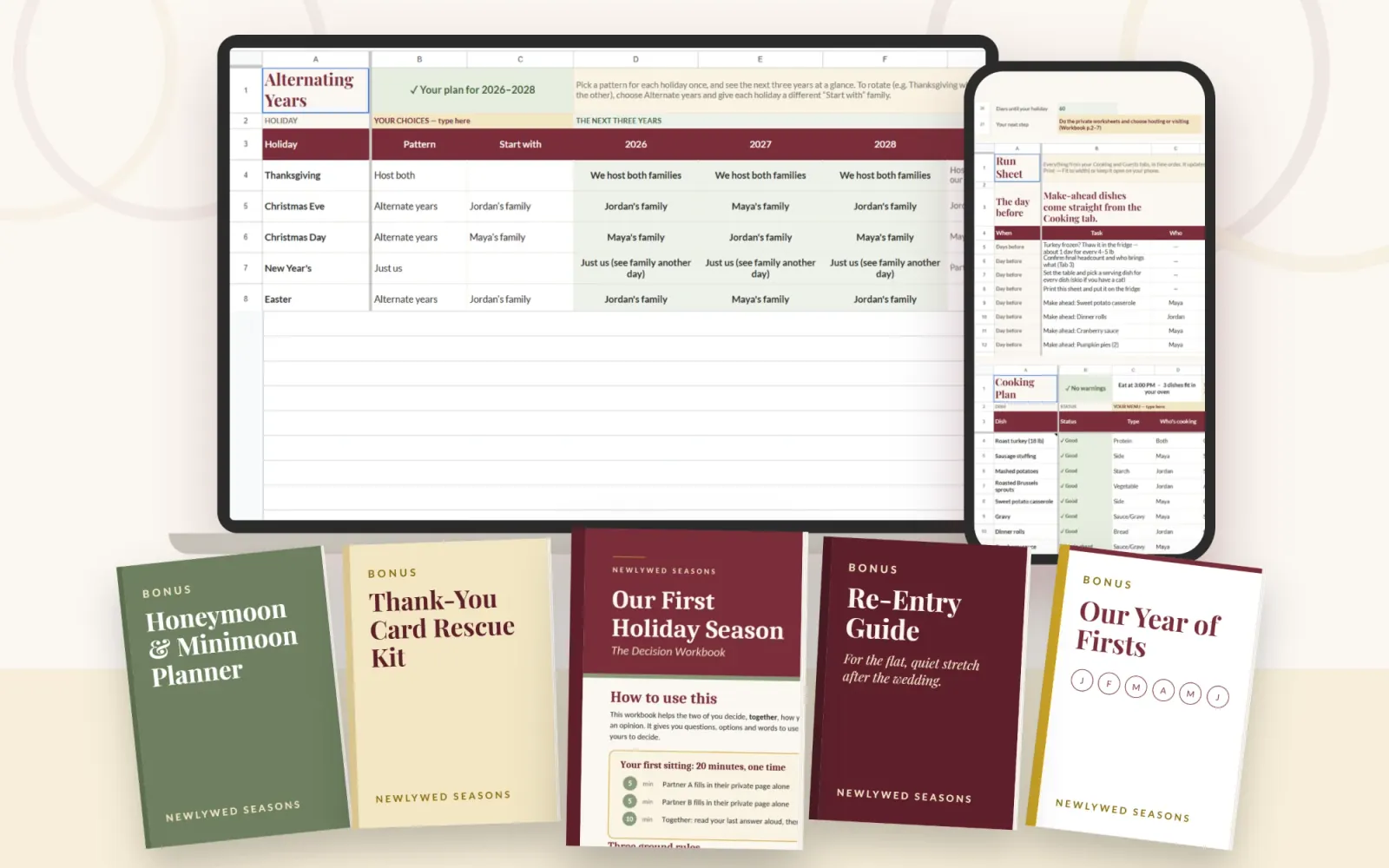
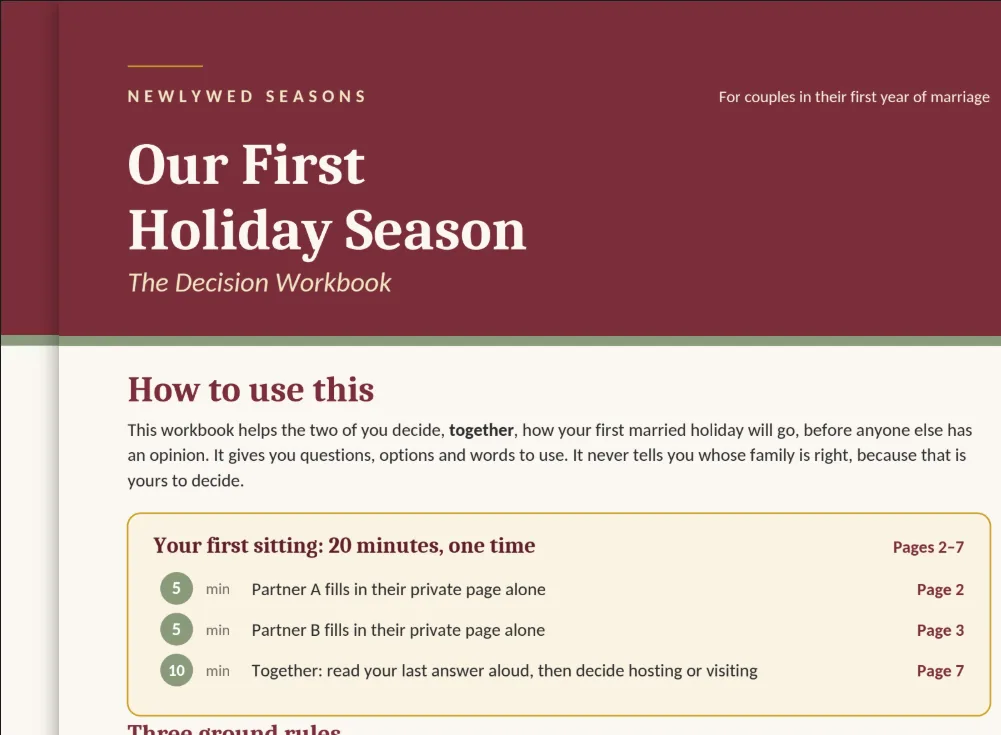
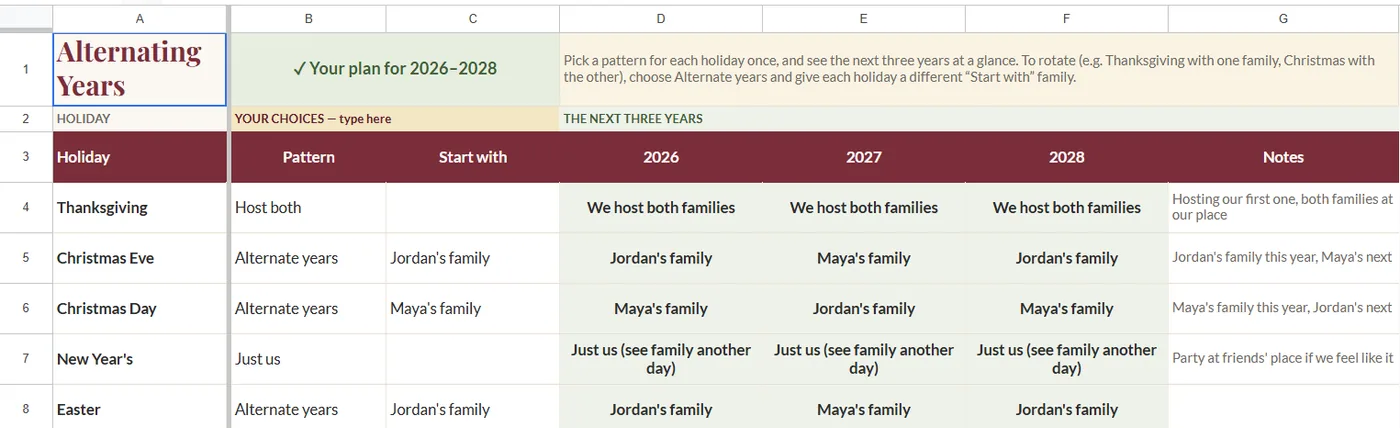
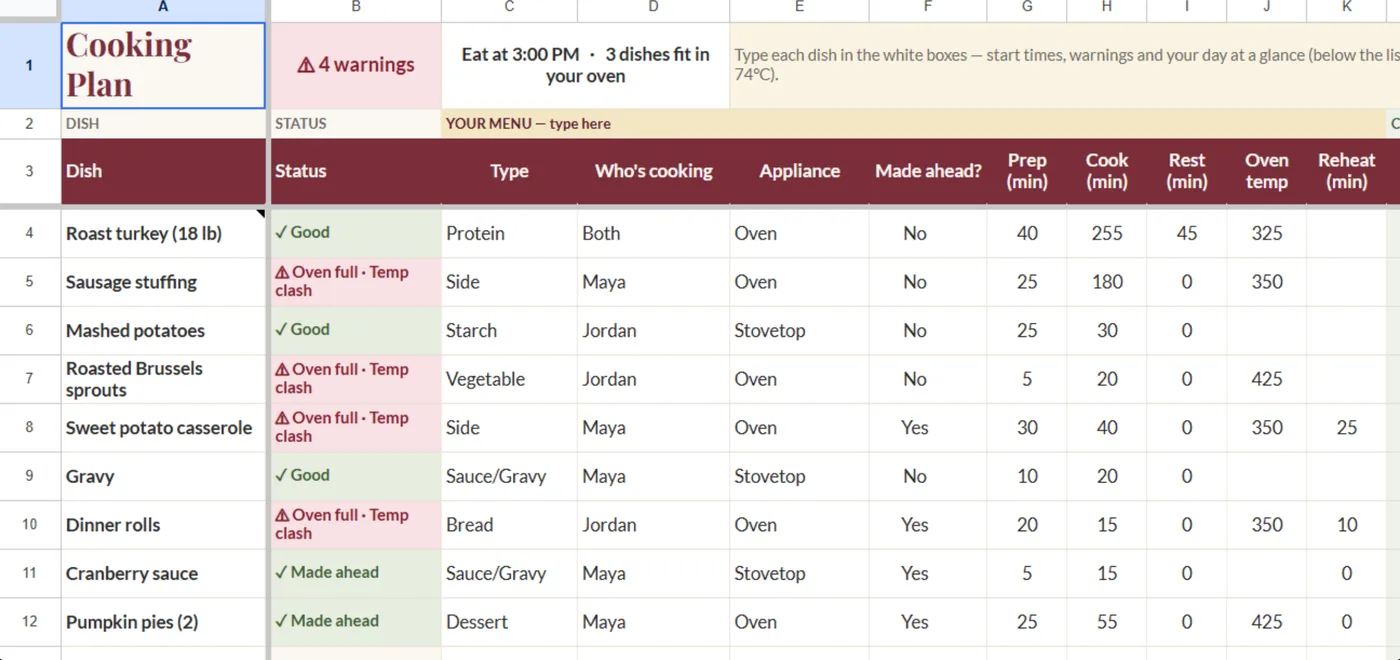
The Our First Holiday Season planner: the Alternating Years and Cooking Plan tabs on a laptop and phone, the Decision Workbook, and the four bonus covers
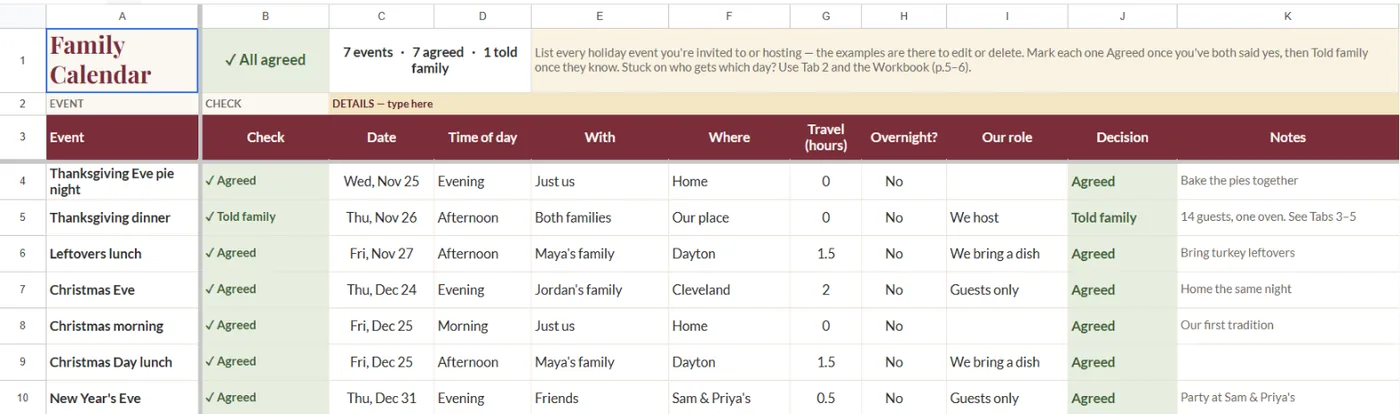
  • Family Calendar, an example screen
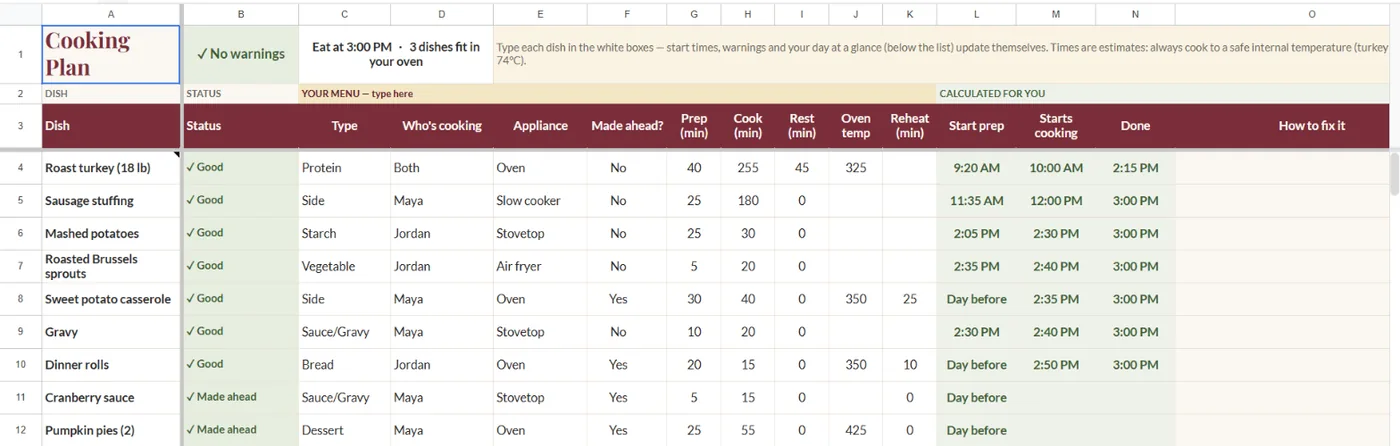
  • Cooking Plan, an example screen
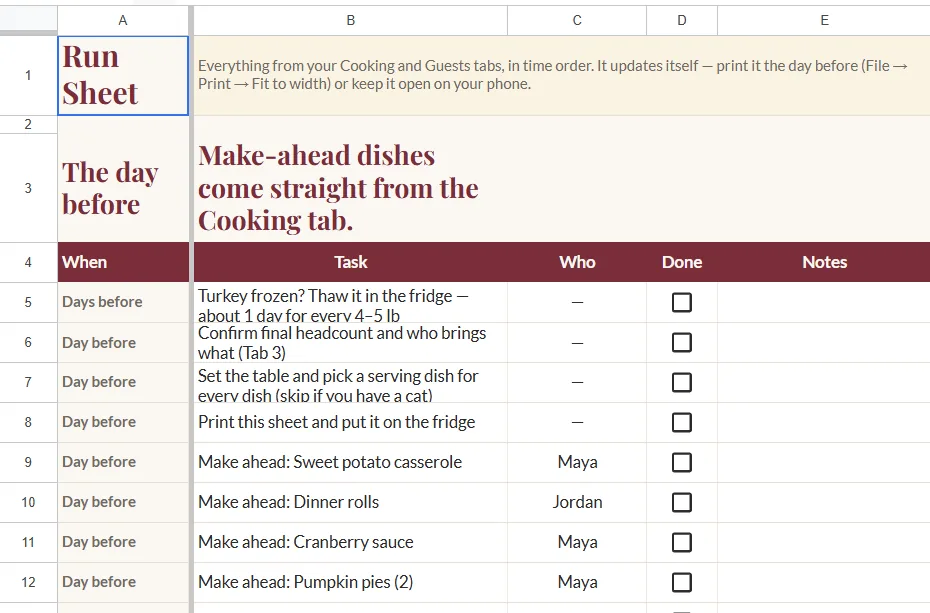
  • Run Sheet, an example screen
  • Decision Workbook, an example screen

Example couple: Maya & Jordan

Launch priceInstant download

Our First Holiday Season Planner

Decide whose house, plan the cooking, map the drive, and know what to say to both families.

$19$29until Oct 25

One-time payment.

  • See both families’ years side by side
  • Make the drive part of the decision
  • Catch oven clashes before the big morning
  • Know exactly what to say to family, firm or soft
  • Google Sheet + PDF workbook
  • Works on your phone
  • 4 bonuses included
What’s included

The Planner Sheet, the Decision Workbook and four bonus tools. See everything that comes with it.

Delivery and refunds

Instant download after checkout. Read the Refund Policy.

Ends Oct 25, 11:59 PM ET · 8d 20h 42m

THE DECISION SYSTEM FOR NEWLYWEDS

Decide Your First Holiday Season Together.

Where you’ll be, what you’ll host, and what to tell both families, for Thanksgiving, Christmas or any holiday you share.

How it works

Three steps, in the right order

  1. Decide privately first

    Each of you works through your own private page before you sit down together. The plan only moves to a shared page once you’ve both said what you want.

  2. Pick your pattern

    Choose alternate years, split the day, host both, rotate the holiday, or just the two of you. The planning system lays out this year and next, side by side, before anyone tells a parent.

  3. Check your kitchen

    Add each dish with its appliance, temperature and timing. The planning system checks it against your ovens, flags any clash, and tells you the fix: slow cooker, air fryer or staggered timing.

Launch price $19 — one-time

Goes to $29 on Oct 26.

Visa · Mastercard · Amex · PayPal

Make a Decision guarantee: Fill in the Start Here tab and your private Workbook pages within 14 days. If the planning system didn’t help you two reach a decision, email us and we’ll refund you.

The Planner Sheet

Decide the holidays before the holidays decide for you

Settle the split

See both families’ years side by side

Put this year and the next two on one screen, so it stops feeling like a tug-of-war between two families. You both see the whole picture before either of you says yes to anyone.

The Alternating Years tab: a pattern per holiday and the next three years side by side
Alternating Years, from the Maya & Jordan example (a constructed couple).

Screenshots are the finished Maya & Jordan example, a constructed couple used to show the planning system. They are not customers.

Pick a pattern and the calendar fills itself in

Alternate years, split the day, host both, rotate the holiday, or just the two of you. Choose what feels fair to both of you from one dropdown, and watch the guessing turn into a plan you can say out loud.

Know who you’re with this holiday, and who’s next

No more scrambling to remember whose turn it was, or dreading the “so, are you coming?” text. You already know where you’ll be, and where you’ll be next time, so you can answer calmly.

The Family Calendar tab: each event, who it is with, where, and the decision on it
Family Calendar: who, where and what’s agreed.

Make the drive part of the decision

Travel hours for each partner sit side by side, so the long drive isn’t something one of you quietly absorbs. It’s part of the choice you make together, out in the open.

Protect the time that’s just the two of you

Holidays can fill up until there’s no room left for the two of you. See how much time is left for just the two of you before you say yes, so your first married holiday still feels like yours.

Host without the kitchen panic

Catch oven clashes before the big morning

Picture the holiday morning without the oven panic. The checker flags dishes that collide on space, temperature or timing while there’s still time to change the plan, not when guests are already at the door.

The Cooking Plan tab showing four warnings, with dishes marked Oven full and Temp clash
Four dishes flagged “Oven full · Temp clash”.

Get the fix, not just the warning

A warning alone only adds worry. For each clash it points to a way out (slow cooker, air fryer or staggered timing) and tells you why it works, so you feel sure about the change instead of just told to make it.

The same Cooking Plan tab with no warnings, every dish with an appliance and a time
The same plan after the fixes: no warnings.

One hosted meal or five

Your first hosted holiday is only the start. Christmas dinner, New Year’s or any gathering you host works the same way, so you’re never staring at a blank page with a knot in your stomach again.

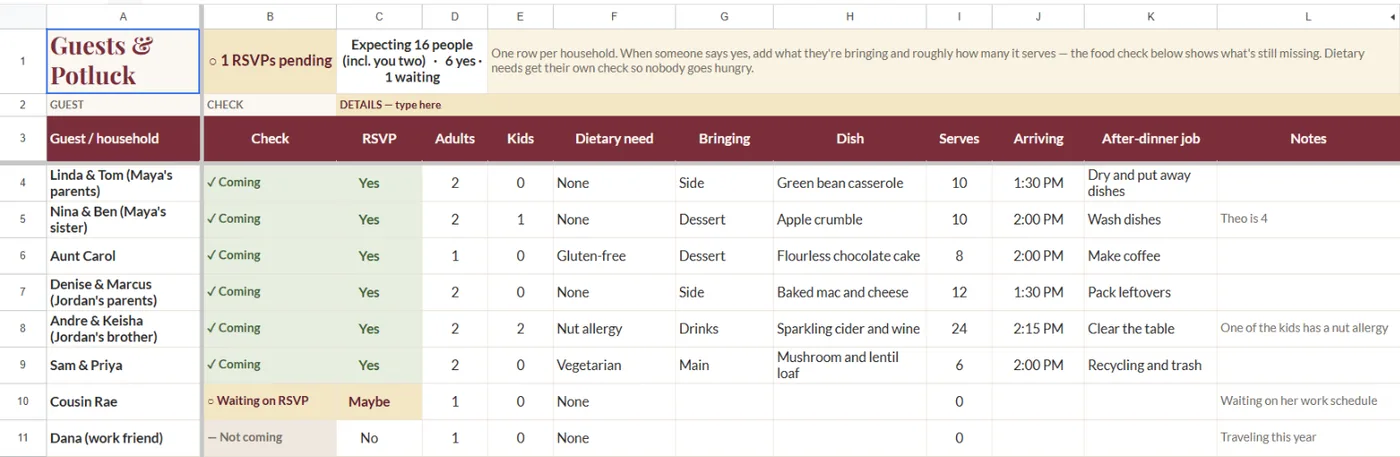
Every guest, dish and dietary need in one place

Two families, a full table and a few dietary needs is a lot to hold in your head. Keep every guest and dish together, and let the coverage checks show what’s missing before someone at your table is left without.

The Guests and Potluck tab with a coverage check for each household
Guests & Potluck: every household accounted for.

Run the day

An hour-by-hour plan, from the night before to serving

Instead of carrying the whole day in your head, you get it mapped out from the night before to serving. You can stop asking “did we forget something?” and actually enjoy your own table.

The Run Sheet tab mapping the day from the day before to serving time
The Run Sheet tab.

Works on your phone, nothing to install

Check it in the car, at your in-laws’, or in the grocery aisle. Nothing to install, just a free Google account, and your plan is right there when you need it.

The Decision Workbook (14 fillable pages)

Have the hard conversation without the fight

Each of you thinks it through first, privately

It’s easier to be honest when nobody is watching. You each fill in your own private page first, so you know what you really want before you sit down together.

The Decision Workbook cover and how-to-use page: Partner A and Partner B each fill in a private page alone
The Decision Workbook: private pages first, then together.

Agree on what “fair” means to the two of you

Half the arguments about holidays are really arguments about fairness. A page just for saying what fair means to the two of you, before either family weighs in with theirs.

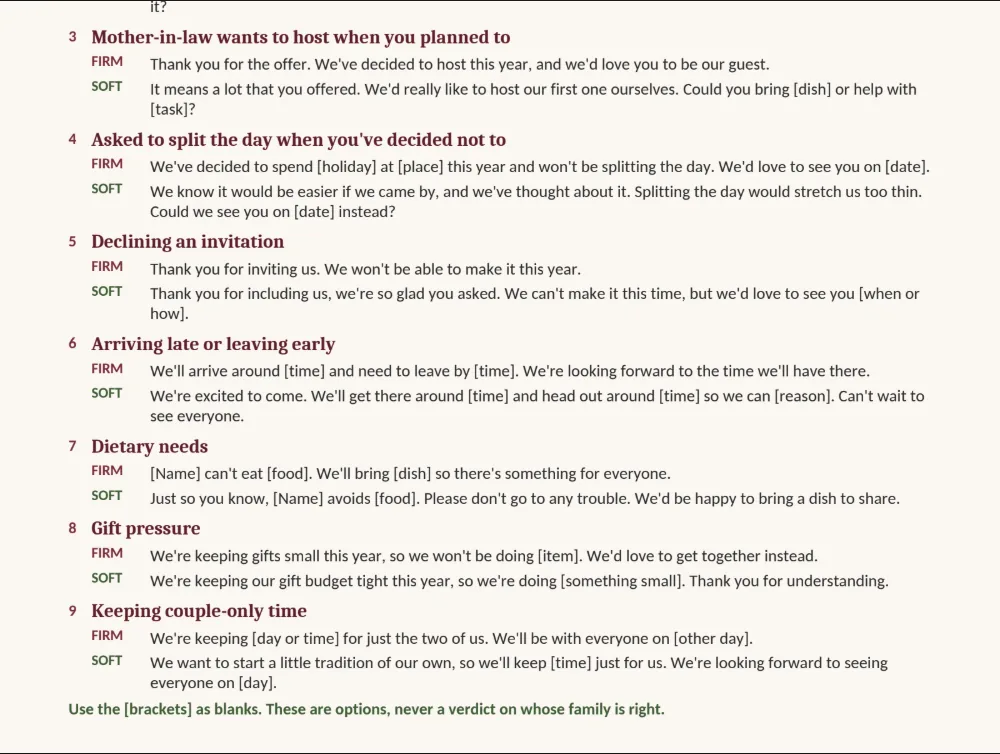
Know exactly what to say to family, firm or soft

The hardest part isn’t deciding, it’s saying it out loud to people you love. Nine situations, each with a firm and a soft version, so you can choose the words that sound like you.

A Decision Workbook page with the firm and soft version of a script side by side
A script page: firm and soft, side by side.
  1. Announcing the plan to parents

    Firm and soft versions

  2. “But we always do it this way”

    Firm and soft versions

  3. When your mother-in-law wants to host

    Firm and soft versions

  4. Being asked to split the day

    Firm and soft versions

  5. Declining an invitation

    Firm and soft versions

  6. Arriving late or leaving early

    Firm and soft versions

  7. Dietary needs

    Firm and soft versions

  8. Gift pressure

    Firm and soft versions

  9. Keeping couple-only time

    Firm and soft versions

Decide whether to host or visit

Hosting or visiting is a big decision to make in a hurry. One page lays out both sides, so you choose together with your eyes open, not because someone else already assumed.

Settle gift expectations before they become a problem

Gift pressure can sneak up and sour a lovely day. One page to get on the same side first, so you walk in agreeing on what you’ll give and what you’ll expect.

Somebody has to say yes first. Whose parents get the call. Whose kitchen the turkey goes in. Whose calendar bends this year.

Most years, one person ends up making that decision alone — not because they wanted to, but because nobody else stepped up to make it together.

This is for you if:

  • You've got a first married holiday coming up — Thanksgiving, Christmas Eve, Christmas Day, New Year's Eve, New Year's Day, or another family gathering.
  • You've suddenly got two families to think about, not one.
  • You're hosting for the first time and you're not entirely sure what that actually involves yet.

Do you already feel a little sick about telling one set of parents before the other one finds out?

Sound familiar?

The first holiday gets complicated fast

  • The early yes

    One of you said yes to your mom before you’d talked it over. Now you’re explaining it to your partner’s side.

  • The mystery dish

    You got voted into “bringing a dish.” Nobody said which one, and you’re hosting for the first time too.

  • The two-house shuffle

    An hour in the car with a pie on your knees, arriving at the second house right as the good conversation ends.

  • The one-oven jam

    One oven, and nine dishes that all need it at 350°F for the same forty minutes.

The same argument keeps coming back every year for one reason: nobody wrote anything down the first time.

You’ve probably already looked

  • Free printable planner
  • Pinterest checklist
  • “Just talk it over” blog post

None of them give you:

  • A calendar built around your two families
  • Words for when the conversation gets uncomfortable
  • A way to know if your oven can actually hold the menu

Advice tells you what to do. It doesn’t do the math, and it doesn’t write the sentence you have to say out loud.

Our First Holiday Season

One purchase. Your whole first holiday, decided and planned.

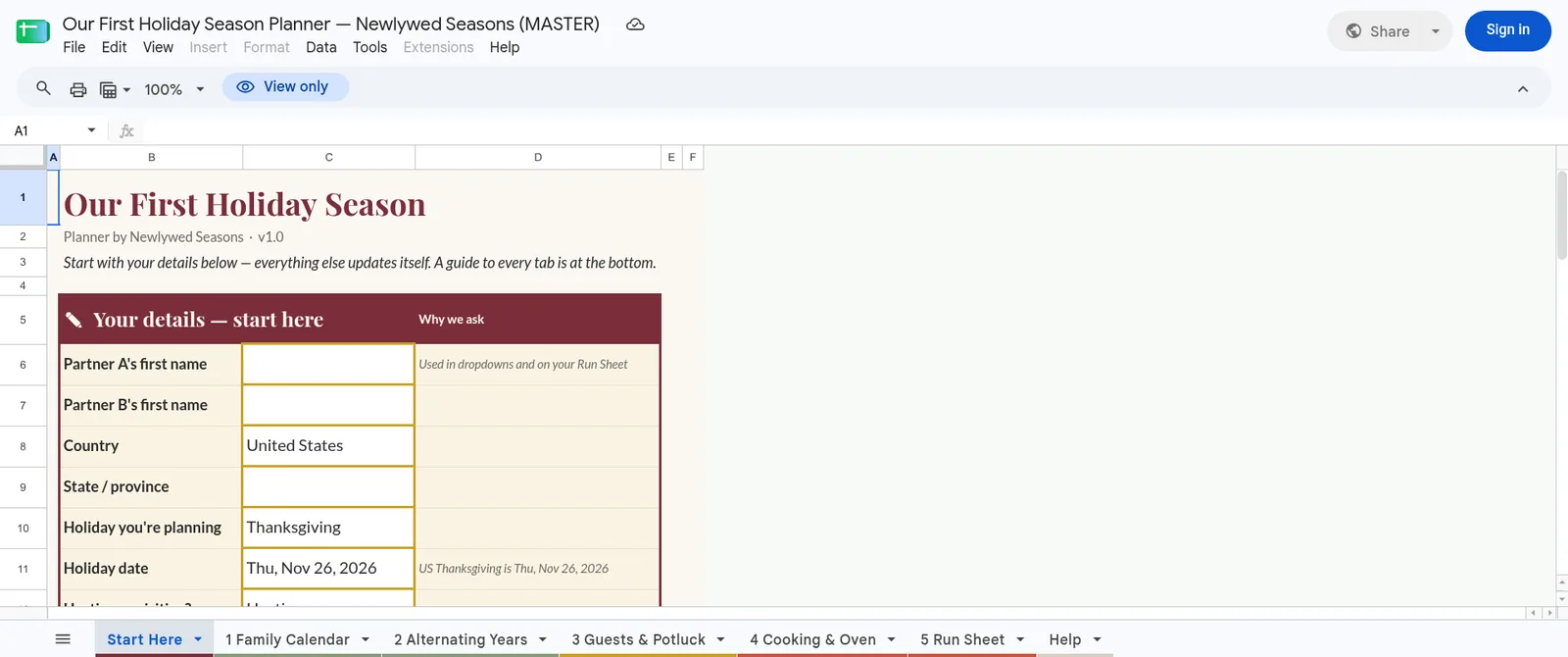
Two parts that work together. The Planner Sheet works out where you’ll be, when, and what’s in the oven. The Decision Workbook gives you the words for both families.

The Start Here tab of the Planner Sheet, with your details to fill in and the five numbered tabs and Help along the bottom
Google Sheet

The Planner Sheet

Know where you’ll be, and what’s in the oven, before anyone asks.

  • Both families’ years side by side, filled in from one dropdown
  • An oven checker that flags the clash and gives you the fix
  • A day-of run sheet, from the night before to serving

Needs only a free Google account.
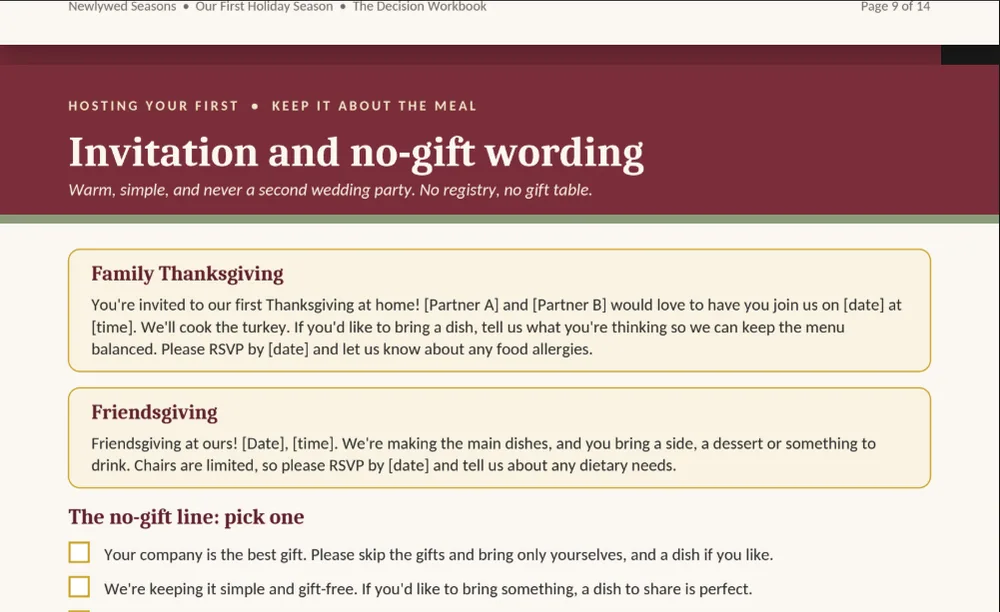
A Decision Workbook page: invitation and no-gift wording, in firm and soft versions
Fillable PDF · 14 pages

The Decision Workbook

Say it once, say it together, and say it your way.

  • Private pages first, one per partner, so you each know what you want before you talk
  • Nine scripts for the hard moments, in firm and soft versions
  • Pages to settle what’s fair, whether to host or visit, and gift expectations

A blank planner leaves the work to you. This one has already done it.

Launch price $19 — one-time

Goes to $29 on Oct 26.

Four bonuses included, shown below.

Visa · Mastercard · Amex · PayPal

Make a Decision guarantee: Fill in the Start Here tab and your private Workbook pages within 14 days. If the planning system didn’t help you two reach a decision, email us and we’ll refund you.

Delivered as a Google Sheet copy link plus PDFs, yours to keep. You need a free Google account; nothing to install.

What happens next

  1. Check out securely.
  2. Get your copy link and PDFs right away.
  3. Fill in the Start Here tab (date, families, ovens) and your plan builds itself.

Included with your purchase

Then your first year keeps going. Four more tools, included.

The holiday is one day. These cover the rest of your first year, at no extra cost.

When you’ll use itAll year long

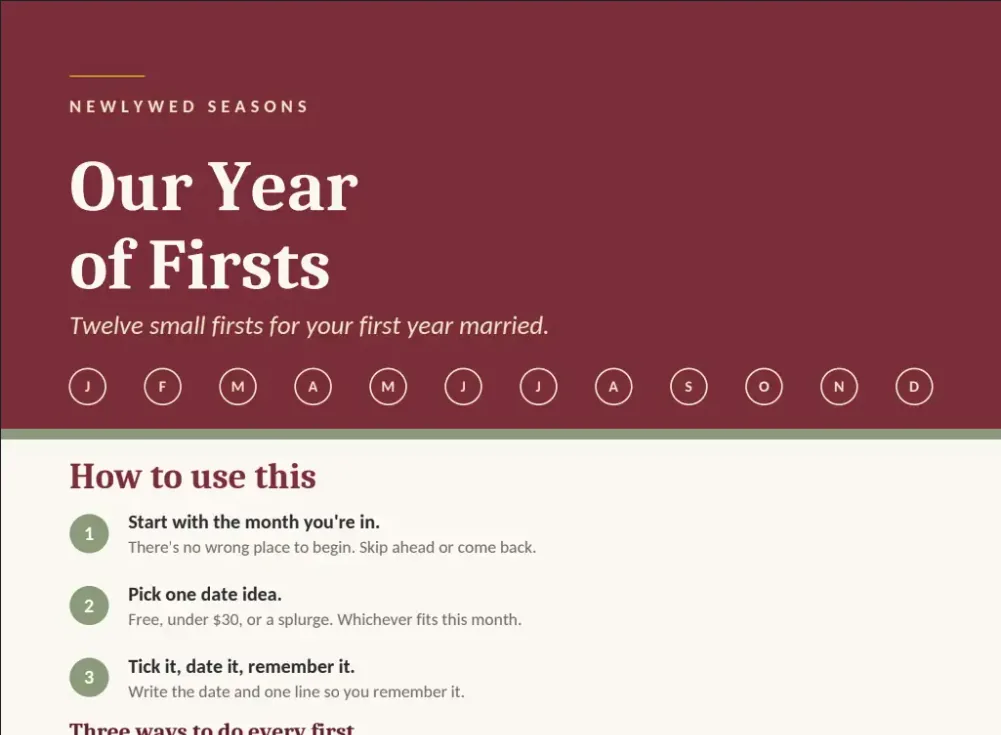
Bonus · Our Year of Firsts

Keep the story of your first year

Page 1 of Our Year of Firsts
Page 1 of Our Year of Firsts.
  • Month-by-month record of your firsts as a married couple
  • Space for love notes to each other
  • Room for new traditions and first-anniversary fields

When you’ll use itRight after the wedding

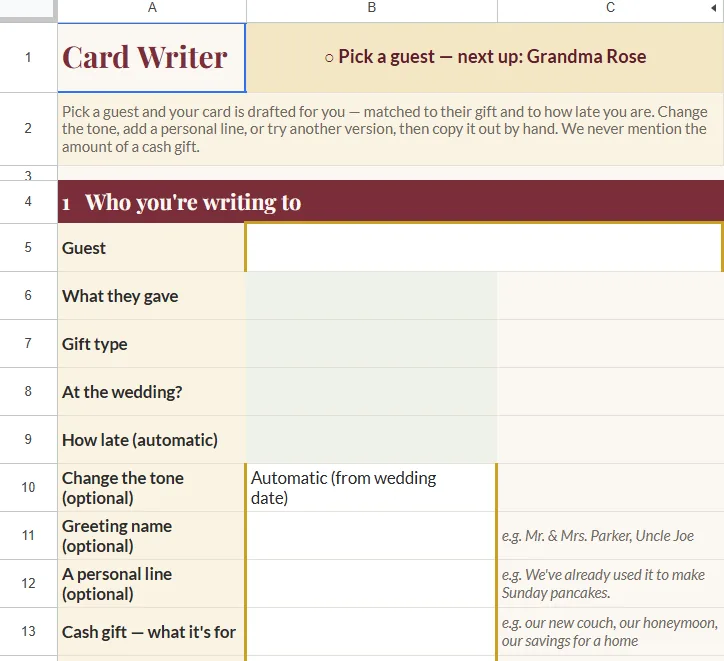
Bonus · Thank-You Card Rescue Kit

Get through the thank-you cards a bit at a time

The Card Writer tab of the Thank-You Card Rescue Kit
The Card Writer tab.
  • Gift log for up to 150 households
  • Card writer drafts each card by gift type
  • Batching plan for working through the stack

When you’ll use itBefore or after the trip

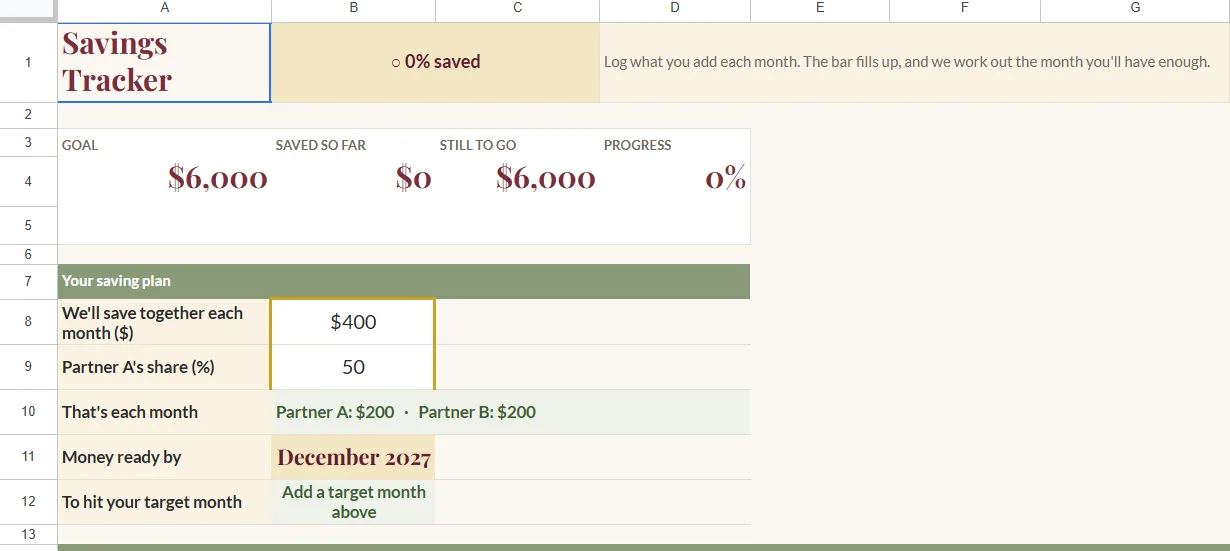
Bonus · Honeymoon & Minimoon Planner

Plan the honeymoon or minimoon together

The Savings Tracker tab of the Honeymoon and Minimoon Planner Sheet
The Savings Tracker tab.
  • Track savings for both partners, with a monthly log
  • Check both schedules with the time-off calculator
  • Shortlist from 33 destinations, filtered by month, budget and style
  • Booking tracker and a day-by-day trip plan

Destinations are a starting point; always check current travel advice before you book.

When you’ll use itWhen the trip is over

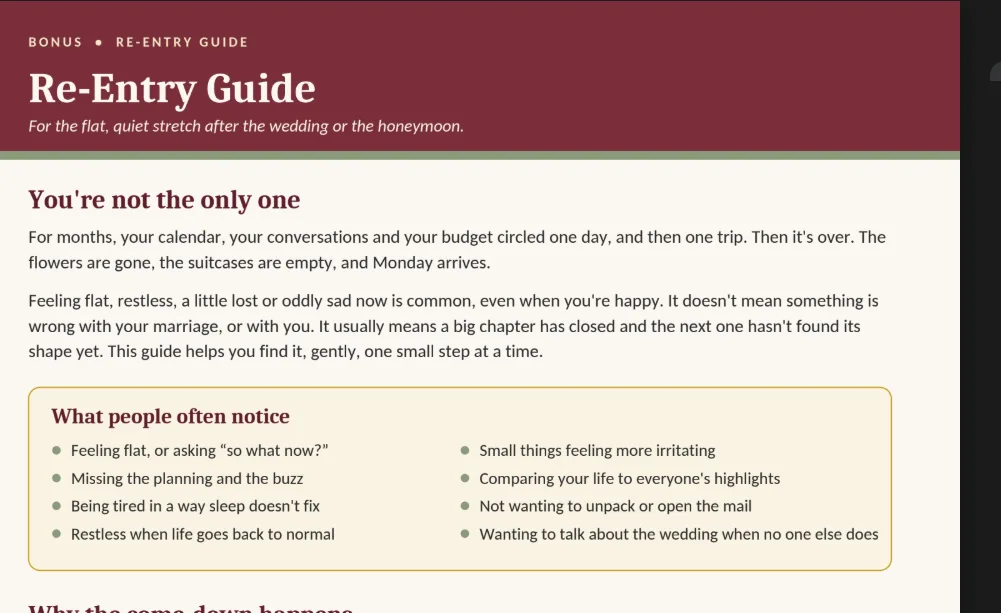
Bonus · Re-Entry Guide

Ease back into normal life after the wedding

Page 1 of the Re-Entry Guide
Page 1 of the Re-Entry Guide.
  • A 7-day routine
  • A look-forward list, so there’s always something next to plan
  • A plain, non-clinical note on when it’s worth talking to someone

Everything above, plus all four bonuses.

Launch price $19 — one-time

Goes to $29 on Oct 26.

Visa · Mastercard · Amex · PayPal

Make a Decision guarantee: Fill in the Start Here tab and your private Workbook pages within 14 days. If the planning system didn’t help you two reach a decision, email us and we’ll refund you.

Delivered as Google Sheet copy links plus PDFs, everything included.

Questions before you buy

I only have one oven — will this actually help?

Yes — that's exactly the problem the oven checker is built around. Tell it how many ovens you have and what you're cooking, and it flags where things collide and what to move instead. (As always: cook to a safe internal temperature and check with a thermometer — the checker handles timing, not doneness.)

Does it work on my phone?

Yes. The main Sheet is built and tested for phones — you don't need a laptop to use it.

Does my partner need their own copy?

No — you both use the same copy of the Sheet and the same Workbook. The private pages in the Workbook are simply filled in separately, before you sit down with the shared pages together. For the private pages, print two copies of those pages or fill them in one at a time on separate devices.

Is it too late for my holiday?

The plan works backward from your own event date, whatever that is — there's no fixed calendar deadline built into it. The earlier you start, the more room you have, but there's no point at which it stops being useful.

What if my first holiday isn't Thanksgiving?

The Start Here tab is built around any hosted holiday meal — Christmas Eve, Christmas Day, New Year's Eve, New Year's Day, or another family gathering all work the same way.

Is this only for our very first holiday together?

It's built around your first married holiday, but it doesn't stop working after that. You can use it again for the next event you host — Christmas, New Year's or any other gathering — and the Year 1/Year 2 view already plans next year, so you know who you're with before either family asks.

Will this start an argument?

It's built to do the opposite — the private pages come first specifically so you each work out what you want before either of you says anything to the other, let alone to a parent. But it's a planning tool, not a mediator; the conversation is still yours to have.

Can I get a refund?

Yes — under our Make a Decision guarantee. Within 14 days of purchase, fill in the Start Here tab and your private Workbook pages. If the planning system didn’t help you two reach a decision, email us and we’ll refund you in full. If you’re charged twice by mistake, we refund the duplicate. If the files don’t arrive or won’t open, we fix it first, and refund if we can’t. Full terms are on the Refund Policy page.

Which Google account or app do I need?

Any free Google account works — you'll use it to make your own copy of the Sheet. No other app or download required.

Who makes this, and is it a general planning system?

Newlywed Seasons makes planning systems for one moment: the first holiday season after a wedding, when two families and one calendar meet for the first time. It's not a general organizing app. It's built around one hosted meal, one set of family decisions, and the conversations that come with both.

Is this legal, financial or family advice?

No. It's a planning tool and a set of conversation scripts — options for you to choose from, not instructions on what your family should do.